Interested in volunteering? Fill this out!
We have many opportunities to volunteer. Many of our volunteers work a shift at a checkpoint, where they greet racers and support crews. These shifts are are usually 4 to 8 hours long. We also have a need for finish line staff and Race HQ staff at the finish line at Peninsula Point Park in Anoka. We need volunteers Friday through Sunday, at locations from Brainerd to Anoka - please record your preferences below. Once we receive your information we will be in touch to figure out details. Thanks!
Welcome volunteers! All the info for volunteers is here.
-
Thank you for volunteering for the Minnesota Paddling Opener!
WHO TO CONTACT
We have a race management team called “The Top Dogs” (Scott, Todd, Chad, and Steve). One of us will always be on duty.
TEXT or CALL the RACE HOTLINE: 612.548.1628
Text is preferred for non-emergencies.
Add this number to your phone now.
Use this number only (not personal numbers).
Racers and support crews will also use this number.
👉 Please text your full name to 612.548.1628 using the phone you’ll carry during the event. Keep your ringer on while you’re volunteering.
WHAT TO BRING
Bug spray
Lawn chair
Snacks and meals
Water bottle
Sunscreen
Warm clothes
Rain gear (coat, umbrella, etc.)
Footwear for wet/muddy conditions
Headlamp or flashlight (if working in the dark)
Binoculars (optional)
Volunteer hat (if you already have one; we’ll provide one if not)
SHIFT INFO
Arrive 10 minutes early for your shift.
You’ll receive a volunteer vest (return it after your shift).
If you’re new, we’ll give you a volunteer hat to keep.
TRACKING RACERS
Racers are encouraged to use Webscorer live tracking. (It's helpful, but not always 100% accurate.) It can be helpful to check the tracking pages to see where paddlers are.
Tracking links:
MR 145: View MR 145
MR 43: View MR 43
MR 20: View MR 20
CR 17:View CR 17
MR 12: View MR 12
ABOUT THE RACES
All races end at Peninsula Point Park in Anoka
MR 145 (145 miles) starts Friday at 3pm
CR 17 starts at noon on Saturday
MR 43 starts 8:00 AM Saturday in Clearwater
MR 20 starts 10:00 AM Saturday in Otsego
MR 12 starts Noon Saturday in Elk River
Root Beer Float (5 miles): Start anytime between Noon–1 PM in Ramsey
All racers must finish by 5 PM Sunday (except CR 17 must finish by 6pm Saturday)
MR 145 racers must have a support crew (in-person or virtual).
More info at:twopaddles.org
PHOTO SHARING
📸 Please take and upload photos of racers, volunteers, and checkpoints. Please upload photos and videos to this Google Photos albumand, if possible, label them with your name and organize by location. Create a new sub-folder if needed. Note: you may need to login to a google account and/or download the app to do this; text us on the race hotline for assistance if it’s not working.
WORKPLACE DONATION
Some workplaces will make a donation if an employee volunteers; if your workplace offers this please let us know by emailing info@twopaddles.org
Join us on Sunday in Anoka!
The Post Paddle Party is from noon-5:00pm on Sunday at Peninsula Point Park in Anoka. All volunteers are invited to come and enjoy the live music and watch boats finish. There will be various paddling businesses and river related non-profit organizations will be there as well. And a wood-fired pizza bus!
ISee maps and directions at the bottom of this page!
-
THE JOB OF A CHECKPOINT VOLUNTEER (Brainerd Dam, Fort Ripley, Little Falls, Blanchard, Sartell and Norin Landing)
For Fort Ripley and Norin Landing: Racers are NOT required to stop at these checkpoints and there is no portage; no need to record the times of people who stop, no cut-off time. LIttle Falls is a portage but racers are not required to check-in there; no cut-off time. Otherwise the job at these three locations is the same as outlined below)
The job of the volunteer at these checkpoints consists of:
Warmly welcome any support crew that arrive and of course any racers and help them connect to each other.
Record the time each boat arrives next to their boat number on the spreadsheet in your 3 ring binder. (Each team’s number will be visible on both sides of the bow (front) of their boat).
Help to set up/maintain and break-down the portage route signage and other equipment as instructed (this may be done by others)
Watch webscorer so you have an idea of who is coming. Racers are strongly encouraged to use webscorer but it is not required, so you can’t rely on it–you have to keep an eye out at all times; racers can arrive anytime at your checkpoint and you need to be ready. For links to live tracking, see the ‘All volunteers’ tab.
Enforce cut-off times. When the cut off time arrives text us right away to let us know who hasn’t checked in. If someone arrives one minute too late, still put them on the list. Anyone who arrives after the cut off time, let them know they are out of the race and that we will be calling them and/or their support crew.
Cut off times (they must get to the start of the portage by):
Brainerd Dam 6:30pm Friday
Blanchard Dam 10am Saturday
Sartell Dam: 4pm Saturday
Text us if anyone pulls out (i.e. quits). And remind them they also need to text us and their support crew.
Checkpoints may have a pop up shelter that can be erected for volunteers to use in the event of rain and/or for shade.
-
You will be assigned to at least one of three jobs:
Check-in
Store
Taking Photos
Check-in: This job entails checking our list to make sure the participant has filled out the waiver. If they have not, have them fill it out online on their phone, or as a last resort, fill out a paper waiver. Each participant also needs to double check their contact info, teammate names and race division and boat type to make sure they are accurate.
Store: This job involves using Square to process transactions to sell t-shirts and other swag.
Photos: This job involves using our camera to take photos of each participant holding a white board with their race number on it.
-
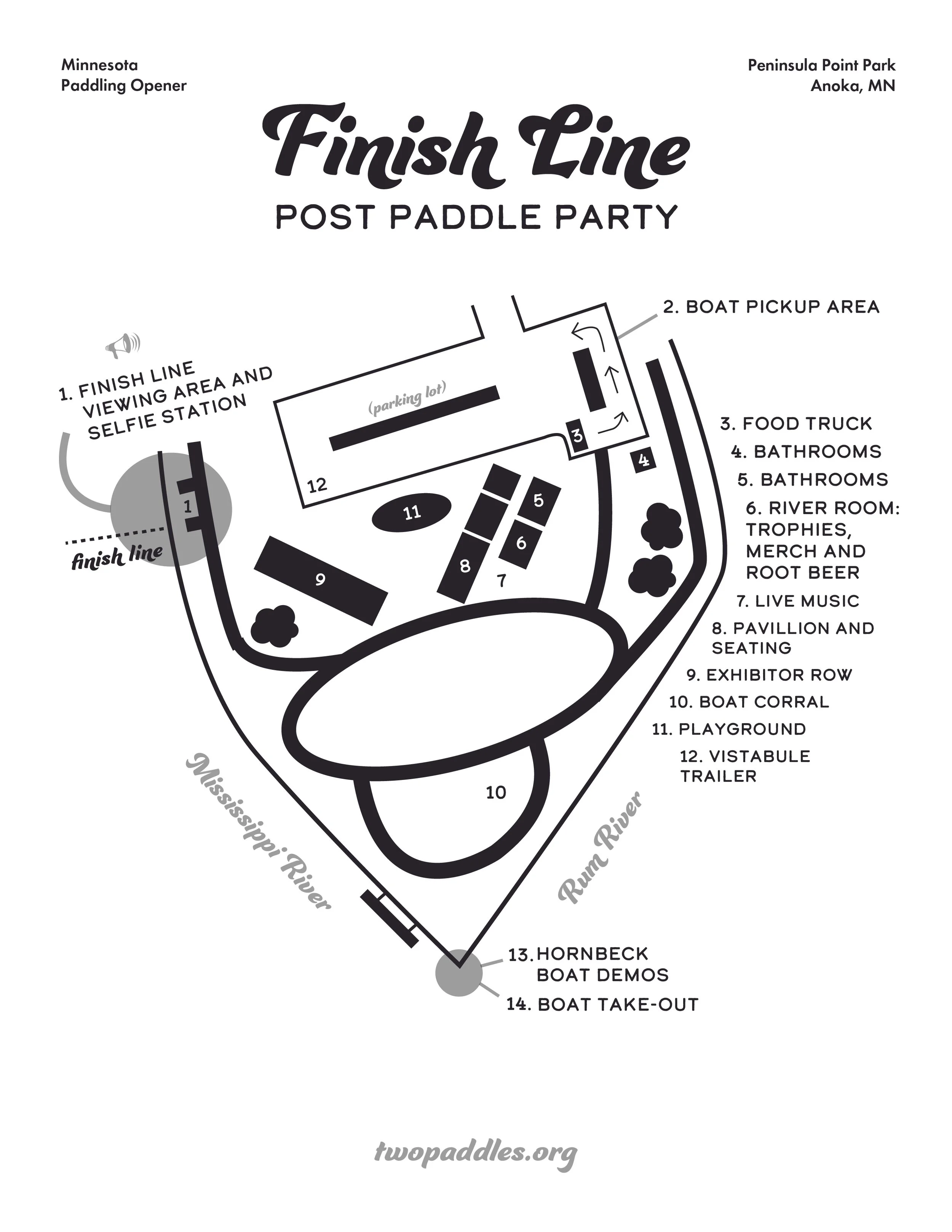
The finish line is at Peninsula Point Park in Anoka We have exclusive access to this park and boat ramp for the weekend. See area map at bottom of this page
Please park at one of the lots shown at the bottom of this webpage.
Chad Brancamp will be the finish line manager.
At the finish line, you will be helping with various tasks; you may be assigned to one task or multiple.
CHEERING: Every volunteer at the finish line is encouraged to cheer loudly every time a boat finishes. It really makes the racers feel good!
TRAFFIC CONTROL: The traffic control manager is Kurt Neuberger.
Familiarize yourself with the 3 parking options shown at the bottom of this webpage.
Traffic control volunteers will greet each car as they pull into lot #1 and warmly welcome them. If the driver is looking for a parking spot, the volunteer will direct them to any open spots in lot #1. If lot #1 is full, the volunteer will give them a paper map showing how to get to lot #2 and #3 and explain that #2 might be full. The map will also show them how to walk back to the park.
If the driver is just here to pick up a boat, the volunteer will direct them into the boat pick-up area of lot #1 and tell them they must go get their boat and exit the pick-up area ASAP; it is not for parking.
TIMEKEEPING: The finish line will be marked by an imaginary line extending perpendicular to the shore and marked by an orange buoy on shore. At night, a spotlight can be used to see boat numbers as they cross this line. Finish line volunteers will record the exact time that the front of each boat crosses the finish line by pressing a button in the webscorer app. If you can take a few pictures of each boat or, better, yet, take a video, as they cross the line that would be great!
If you have time to watch the “Webscorer Timing Tutorial” video at this website: https://www.webscorer.com/resources/tutorial-videos that would be awesome. But if not,
you will receive instructions on-site for exactly how to record the time.
GREETER: Once racer’s have reached the boat take-out area encourage them to get their boat out of the water as soon as they can. Welcome and congratulate each team of paddlers once they are on shore. Help guide them and ensure they visit RACE HQ to get their swag. Show them where the boat corral is where they can stash their boat.
RACE HQ
Welcome the team to Race HQ and congratulate them on finishing. Ask them their boat number and/or their name and use the printed spreadsheet to find the t-shirt size that they ordered. (It might say that they signed up too late and do not get a t-shirt or that they chose not to get a t-shirt and instead donated the t-shirt cost to our scholarship fund).
Grab a swag bag that is labeled with the correct size t-shirt (or no t-shirt) and give it to them.
If they finished, grab the corresponding finisher medal and give it to them or put it in the bag.
Use an internet connected phone or tablet to look at the real-time race results to see if they get a trophy. Paddlers who finish 1st, 2nd or 3rd in their division win a trophy. Find the appropriate trophy.
If they won a trophy, write down which trophy they are getting (for example, 2nd place women’s solo MR 25 race). If a team has multiple members, offer them a choice of how many trophies they want. They can have up to one trophy per team member (even on a six person relay team)).
Paddlers who signed up for a non-competitive tour division do not get a trophy but DO get a finisher medal, t-shirt and swag bag.
5-mile root beer float participants do NOT get a t-shirt, trophy or medal but do get a swag bag.
STORE: This task involves promoting and selling our awesome for-sale items. Available swag may include t-shirts, mugs, hats, posters and stickers. People can pay with cash or credit card. The store is run through Square and there will be an internet connected tablet to process transactions. Store volunteers will also help monitor the adjacent Root Beer station where people can get free root beer. Volunteers should re-stock ice and root beer as needed.
SELFIE STATION: We are planning to have a device that we would like you to take each participant’s picture with. If the participants would like you to also take a picture with their device, please do so. Please familiarize yourself with the various options for stickers that can be used to decorate the station, and please make sure that every team’s boat number is written down on the selfie station for their photo.
BOAT CORRAL: Help make sure boats are organized to take up as little space as possible, but leaving aisles so people can easily pick them up as needed. Help people bring their boat over to the corral as needed.
-
Your job is to welcome everyone who is riding the shuttle. We will email you a list of their names about one day before the event. We tell people to board the shuttle at:
10:30am Saturday for the CR 17
5:45am Sunday for the MR 43
8:15am Sunday for the MR 20
10:15am Sunday for the MR 12
so please get to lot #2 (see bottom of this webpage) 20 minutes before the shuttle is scheduled to leave, to welcome people and take attendance. Call or text us at 612.548.1628 if there are any problems. Then ride the shuttle back to the race start with everyone. Thanks!
-
Your job is to welcome people who are dropping off their boats and then watch over the boats while they drive to the finish line.
People are told to drop their boats off between 9am and 9:30am so please arrive by 8:55am at the dog park at Crow-Hassan Park Reserve. Of note: the boat corral will be set up on the grass off the south side of the parking lot (the opposite side of the lot from the path to the river).
You can remind people who are taking the shuttle that they need to board the shuttle at lot #2 (see bottom of this webpage) by 10:30am to get back by the required safety meeting at 11:15am and the race start at noon.
-
Your job is to welcome people who are dropping off their boats and then watch over the boats while they drive to the finish line.
People are told to drop their boats off between 9am and 9:30am so please arrive by 8:55am at the Babcock Park Boat Ramp in Elk River. Of note: you need to drive all the way through the park to the boat ramp; people will gather and leave their boats in the parking lot right by the boat ramp. No one should leave their boat anywhere else in the park.
You can remind people who are taking the shuttle that they need to board the shuttle at lot #2 (see bottom of this webpage) by 10:15am to get back by the required safety meeting at 11:15am and the race start at noon.
-
Your job is to welcome people who are dropping off their boats and then watch over the boats while they drive to the finish line.
People are told to drop their boats off between 4am and 4:30am so please arrive by 3:55am at the Clearwater Boat Ramp .
You can remind people who are taking the shuttle that they need to board the shuttle at lot #2 (see bottom of this webpage) by 5:45am in order to be back for the requried safety meeting at 7:15am and the race start at 8am.
-
Each light has two buttons: power on the left and “adjust tempo” on the right
Press the power button to turn light on.
Press power button to switch between modes
Press and hold power button to turn off.
Modes:
DayLightning: powerful use during the day
Steady pulse: DO NOT USE
Steady–DO NOT USE
Zoom–DO NOT USE
Triple Flash–preferred mode for night time use.
Random Flash–DO NOT USE
Low battery indicator: The light flickers when turning on/off, indicating a charge is needed.
When charging, the light flashes
When fully charged, there will be a solid LED.
-
Equipment needed:
Shirts, mugs, posters, stickers; stuff for sale
Cash box
Tablet for recording sales on the Square App
Square Reader
Tables to display stuff on
Chairs for sitting
Pop up shelter with banner that says STORE
Price list (tape up and/or tape to tabletop)
To set up point of sale:
Turn tablet on (the tablet we are currently using is, on it’s backside, labeled “Back up tablet not waterproof”-
Open Square App
Get username and password by texting or calling Scott Miller or Heidi Sandstad or finding the printed version of these instructions.
UNLIKELY TO NEED: If it asks you for verification method, send a text to the phone number that is in there and then call Scott Miller at the race number or at his personal number 612.991.3953 and he will give you the code
Follow instructions to connect the Square Reader (you need the reader if you are using a tablet; if using a phone you can use it, but you can also use ‘tap to pay’ just using your phone without the reader)
Make sure bluetooth is turned on on the tablet (or phone) you are using. HomeButton>Settings>Connections>Turn Bluetooth on. Go back to Square app
Open the square app.
Tap settings (via the three horizontal line icon) then hardware then square reader then tap connect a reader
Press and hold the power button on the square credit card reader for about 3 seconds. When four orange lights start flashing, release the button. A bluetooth pairing request will appear on your device. Tap OK and you’re ready to take payments.
Square reader other info::
4 green lights=fully charged
3 green lights=75% charged
2 green lights=50% charged
1 SOLID RED light=25% charged
1 blinking red light means your batter is low and you should charge it immediately.
Re-charge the device at any time; you can leave it plugged in if you want.
How to take a payment:
In the square app, tap CHARGE and wait for a single green light to appear on the reader. The customer can then hold their card or phone near the reader to trigger payment OR The customer can then insert a chip card. They must leave it in place until four green lights are visible.
PLEASE RECORD CASH PAYMENTS IN THE SQUARE APP AS WELL (when you click ‘charge’, one of the options (usually the first option) is CASH. Select that.
It might have the person put in an email or phone number for a receipt but it may not if it has that info stored and it automatically sends a receipt.
-
DRAFT/Under Construction
Saturday Morning:
Set up finish line and timing area in the designated place west of the main building at Peninsula Point Park (map resource forthcoming)
Find power source to plug in extension cords and power strips
Put sponsor banners on archway
Blow up archway; keep on shore
Set up the light for the archway (doesn’t need to be done until evening)
Using orange traffic cones, make a line across the end of the parking lot that will be a vehicle free zone.
Set up 3 EZ-UPS. One for RACE HQ (trophies, medals, t-shirts, swag bags). One for STORE.. If we have walls for EZ UPS and it’s windy or rainy, put up walls on one or two of them. Set up tables under the EZ UPS. Bring a picnic table or two over if that seems helpful/possible. Use water/sand bags to anchor the EZ ups if it’s at all windy’Put banners on each of the EZ Ups to mark them as RACE HQ, STORE, etc.
Set up Root Beer station (coolers and metal tubs) with ice and root beer, right next to the store or as part of the store; if there’s enough EZ ups consider putting one up for the root beer station.
Set up RACE HQ with swag bags, trophies, t-shirts and medals. Make sure you have printed out spreadsheets that show t-shirt sizes and where trophies can be marked off (who got what)
Set up the store; figure out how to display all the wares. Hang t-shirts. Use paperweights and bins to keep things protected as needed.
Set up the selfie station, with an EZ up over it or next to it if weather necessitates.
Put a buoy on short that marks the finish line.
Set up wifi hotspot
The WiFi network is called Verizon-RC400L-28
The username is admin
The password is either twopaddles or 26d16783
Get tablets/phones ready for timing purposes.
Sunday Morning:
Welcome all the sponsors; show them where to set up their booths
Set up a sign on South Ferry Street just east of the Hwy 169 intersection that says “MN Paddling Opener parking ¼ mile ahead down the hill”
Set up an EZ up where the band will play (the outside area just to the south of the river room).
Welcome the band and show them where they will be.
Welcome and orient volunteers as they arrive.
-
HOW TO DO TIMING AT THE FINISH LINE:
Open the webscorer app
If you need to log-in, our log-in username is info@twopaddles.org and our password is kymgiV-7fexce-kiszeb
If it says “Your PRO account is limited to one device” click on MANAGE DEVICES.
You can use Normal view; in this view you will just have all the boat numbers listed and you tap on whichever boat number is finishing, right at the exact time they reach the finish line. OR
You can use Fast-tap view if multiple boats are finishing at the same time or if normal view isn’t working well because there’s too many boat numbers: In this view ONE person taps the timer button everytime a racer reaches the finish line while a SECOND person writes down the boat numbers of each boat that finishes, in the order that they finish. Then when things have calmed down you can return to the multiple time stamps, tap the bib/boat number for each time stamp and then tap the corresponding bib/boat number.
Another option is keypad view; in this one you tap the timer button to record a time stamp and then associate a bib/boat number to by TYPING in the bib/boat number instead of tapping it. So this is a good option if tapping the numbers is proving unwieldy.
The Fast-tap view and the Keypad view allow you to:
Pre-enter the bib number of an approaching racer, Followed by tapping the timer button to record the time stamp
Correcting Errors
There are ways to undo or cancel most of the taps and timing actions. It's useful to intentionally create errors during a practice timing effort before the actual event, as even the most experienced timer will make a mistake when tapping the screen potentially hundreds of times during the race. It's important to know what to do when the unexpected error situation occurs - as each scenario may require a slightly different response. Let's cover some of the most common error situations.
Note that the app uses the yellow color as a cue for error correction - so if an item on the screen is yellow, you can tap it to make a correction.
How to cancel a tap & swap a racer
In Normal view, when you tap a racer box, the box will turn yellow for 5 seconds. When you tap the box while it's yellow, a panel will pop up giving you an option to cancel the tap, or to swap the tap to another racer. This covers the two most common mistaps - an inadvertent tap, and tapping the wrong racer. If you choose to cancel, the app will ask you to confirm. If you choose to Swap racer, you'd tap the racer box you originally intended to, and the time stamp will be reassigned to that racer.
If you miss the 5-second window when the box is yellow to make a correction, tap the Fast-tap view toolbar button, and you can find the most recently tapped entry as the last item on the fast-tap list.
In Fast-tap view, you can cancel or swap any entry at any time during the race, simply by tapping the yellow Sequence # field. A panel will pop up giving you an option to cancel the entry or to swap the racer assigned to that time stamp.
In Keypad view, tap the yellow Sequence # field to cancel an entry. To swap a racer assigned to that time stamp, simply tap the yellow Bib field and edit the assigned bib number.
How to edit a time stamp
During the race, you can make time adjustments to all recorded time stamps at any time. For example let's assume you tap a time stamp for a racer 5 seconds too late. The easiest way to make a correction is in the Fast-tap view. Tap the yellow Race clock field for that racer, which will bring up a time editor allowing you to subtract the 5 seconds from the racer's time stamp.
-
Supplies: 40 route arrows, 1 A-frame sign, 1 go straight yard sign, 1 go right yard sign (if available:1 additional right turn and 1 left turn yard signs)
St. Cloud: Put one yard sign with a “keep going straight” arrow about halfway through the portage trail. Put one yard sign with a right-facing arrow at the top of the stairs at the end of the portage.
Sauk Rapids portage: Use green route arrows to mark the portage every 40 feet or so. At any turns (we think there is only one right turn, at the end), put a two route arrows at a 45 degree angle ten feet before the turn and then two arrows right at the turn. If you’ve got an extra right turn yard side use that at the turn as well.
Sartell portage: Put route arrows every forty feet or so the length of the portage, with extra arrows at the left-hand turn into the park at the end of portage. Put an A-frame sign at the boat ramp that says “Paddlers: After you go under the bridge, GET LEFT. Rapids portage is ¾ of a mile past the only bridge, on the left.
Where to Park at the Finish Line/Post Paddle Party
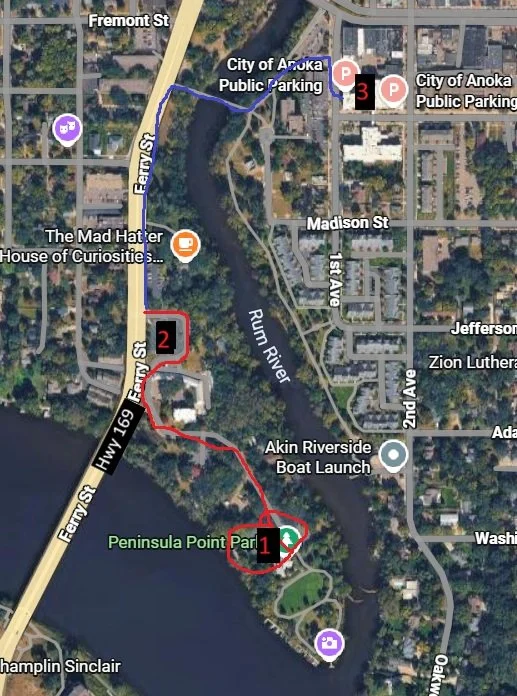
Take Hwy 169 and turn east on S. Ferry Road just north of the Mississippi River (by the #2 in the picture at left).
The best parking is at Peninsula Point Park (the #1). If that is full, park at the #2 lot at the and walk 7minutes down the red line path (on the road) to get to the park. If lot #2 is full, park in the #3 free City of Anoka public ramp and follow the blue and red lines 14 minutes on foot to get to the park.
Feel free to drive down to the park and drop people off before parking in lots 2 or 3.
Check out this map of the Finish line/Post Paddle Party area at Peninsula Point Park